

Documentation
Docs
Introduction
Getting Started
Tutorial: build an app
Core Concepts
Routing
Server-Side Rendering
Mimir, state management
Pages & Layouts
API Routes
Styling & Theming
Building & Deploying
API Reference
Guides
Recipes
FAQ (use cases)
Architecture
This page is the map. Every other chapter zooms into one box of it.
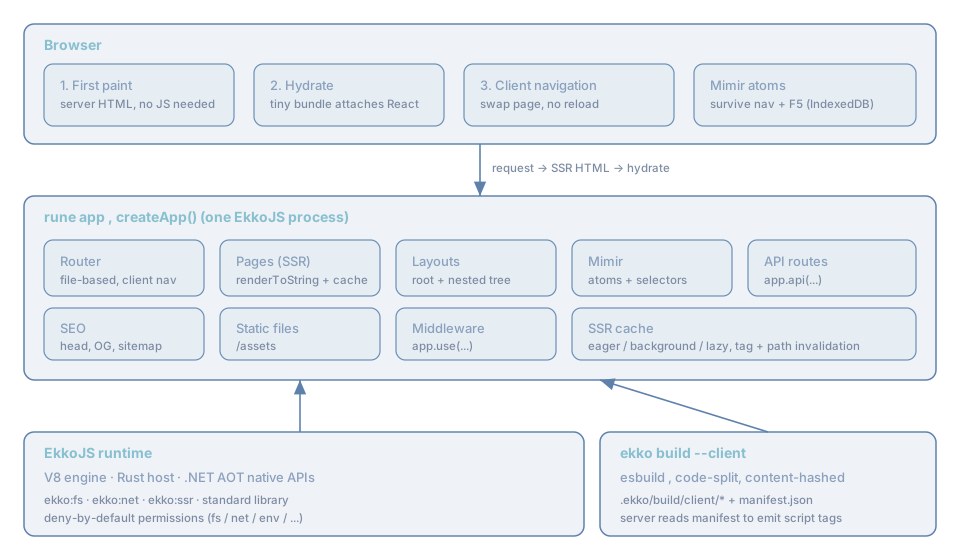
The three layers
1. The browser. On the first request it receives complete, server-rendered HTML, so the page is visible and indexable with no JavaScript. A small bundle then hydrates that markup (attaches React event handlers and reads the embedded state). After that, the app behaves as a single-page application: clicking an in-app link navigates on the client, swapping the page component without a reload. State held in Mimir atoms is not part of the page component, so it survives those navigations, and, with a session enabled, survives a full refresh too.
2. The rune app. A single EkkoJS process created by createApp(). It contains:
- the router (file-based on the server, history-based on the client),
- pages rendered with React's
renderToStringand stored in an SSR cache, - layouts composed around each page,
- Mimir for state,
- API routes registered with
app.api(...), - SEO tag generation, static file serving, and middleware.
3. The runtime + the build. Underneath sits the EkkoJS runtime (V8 + a Rust host + .NET-AOT native
APIs) exposing the standard library (ekko:fs, ekko:net, ekko:ssr, ...) under a deny-by-default
permission model. Alongside, ekko build --client compiles your pages into a code-split browser bundle and
a manifest.json; the running server reads that manifest to emit the correct <script type="module"> and
<link rel="modulepreload"> tags for each page.
The request lifecycle, in one breath
- A request for
/aboutarrives. - The server finds the route, calls the page's
ssr()(for the title, head tags, and seed state), renders
the React tree to an HTML string, wraps it in the layout, and assembles a full document, with styles, the
page's script tags from the manifest, and a JSON <script> carrying the hydration data.
- The browser paints immediately, then loads the hydration bundle and takes over.
- The user clicks "Docs". The client router matches
/docsagainst the route table baked into the page,
imports that page's chunk, and renders it in place. No server round-trip; atoms are untouched.
The exact mechanics are in The rendering pipeline and Hydration.
Where each concern is documented
| Box in the diagram | Chapter |
|---|---|
createApp, lifecycle | The application |
| Router (file-based) | File-based routing |
| Router (client) | The router, Navigation |
| Pages (SSR) + cache | SSR overview, Strategies |
| Layouts | Layouts |
| Mimir | Mimir overview and the whole Mimir chapter |
| API routes | Defining routes |
| SEO | SEO |
| Build + manifest | The build, The manifest |
| Permissions | Permissions |
Next, get it running: Installation.