

Documentation

Docs

Introduction

What is rune

Philosophy

Why rune

Architecture

Getting Started

Installation

Quick start

Project structure

The dev loop

Tutorial: build an app

1. Create the app

2. Pages & routes

3. Layouts

4. State with Mimir

5. SSR & data

6. API routes

7. Styling

8. Build & deploy

Core Concepts

The application object

Rendering pipeline

Hydration

The build manifest

Configuration (ekko.json)

Permissions

Conventions

Routing

File-based routing

Dynamic routes

The router (useRouter)

Navigation & Link

Guards & redirects

Programmatic routes

Server-Side Rendering

Overview

The ssr() function

Strategies (eager/lazy)

SSR → hydration

Caching & invalidation

SEO

Mimir, state management

Overview

Atoms

Reading & writing

Selectors (derived state)

Subscriptions & the store

SSR & hydration

Persistence & sessions

Patterns & recipes

Pitfalls

Pages & Layouts

Pages

Layouts

Error & not-found

API Routes

Defining routes

Request & response

Middleware

helmet

cors

rateLimit

bodyLimit

validateContentType

csrf

requestId

timeout

errorHandler

httpsRedirect

secureCookies

ipFilter

safePath

Validation & options

Styling & Theming

SCSS

Theming (light/dark)

Asgard integration

No flash (no-FOUC)

Building & Deploying

The build

Static assets

Production deploy

API Reference

ekko:rune

ekko:rune/router

ekko:rune/mimir

ekko:rune/seo

ekko:ssr / css

ekko.json schema

CLI commands

Guides

Rune app from scratch

Recipes

Dark mode

Forms

Data fetching

Authentication

Pagination

FAQ (use cases)

Documentation

Docs

Introduction

What is rune

Philosophy

Why rune

Architecture

Getting Started

Installation

Quick start

Project structure

The dev loop

Tutorial: build an app

1. Create the app

2. Pages & routes

3. Layouts

4. State with Mimir

5. SSR & data

6. API routes

7. Styling

8. Build & deploy

Core Concepts

The application object

Rendering pipeline

Hydration

The build manifest

Configuration (ekko.json)

Permissions

Conventions

Routing

File-based routing

Dynamic routes

The router (useRouter)

Navigation & Link

Guards & redirects

Programmatic routes

Server-Side Rendering

Overview

The ssr() function

Strategies (eager/lazy)

SSR → hydration

Caching & invalidation

SEO

Mimir, state management

Overview

Atoms

Reading & writing

Selectors (derived state)

Subscriptions & the store

SSR & hydration

Persistence & sessions

Patterns & recipes

Pitfalls

Pages & Layouts

Pages

Layouts

Error & not-found

API Routes

Defining routes

Request & response

Middleware

helmet

cors

rateLimit

bodyLimit

validateContentType

csrf

requestId

timeout

errorHandler

httpsRedirect

secureCookies

ipFilter

safePath

Validation & options

Styling & Theming

SCSS

Theming (light/dark)

Asgard integration

No flash (no-FOUC)

Building & Deploying

The build

Static assets

Production deploy

API Reference

ekko:rune

ekko:rune/router

ekko:rune/mimir

ekko:rune/seo

ekko:ssr / css

ekko.json schema

CLI commands

Guides

Rune app from scratch

Recipes

Dark mode

Forms

Data fetching

Authentication

Pagination

FAQ (use cases)

Hydration

Hydration is the moment a static, server-rendered page becomes a live React app without throwing away the HTML the server already sent. rune does this for you; this page explains the machinery so you can reason about it (and debug it).
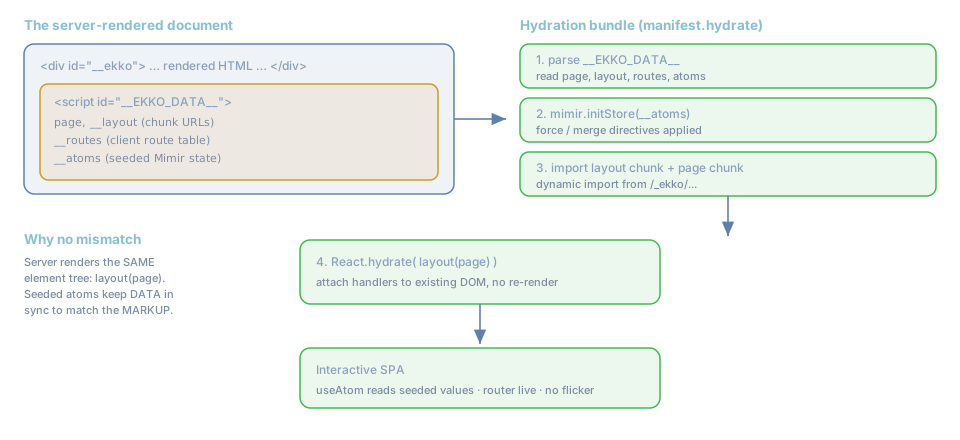
rune hydration

The payload: __EKKO_DATA__

Every rune document ends with a JSON script the server emitted:

1
2
3
4
5
6
7
8
9
10
11
12
<script id="__EKKO_DATA__" type="application/json">
{
"page": "/_ekko/pages/index-LNH6OYEF.js",
"props": { "params": {}, "query": {}, "path": "/" },
"__atoms": { "site-theme": "dark", "count": { "__force": true, "__value": 3 } },
"__routes": [ { "pattern": "/", "pageFile": "/_ekko/pages/index-...js" }, { "pattern": "/docs", ... } ],
"__routerConfig": { "backRules": [], "beforeUnload": [] },
"__layout": "/_ekko/pages/layout-FC6L7ZBH.js",
"__user": null,
"__sessionMode": "ephemeral"
}
</script>

Each field has a job:

FieldUsed for
pageThe current page's client chunk to hydrate.
__layoutThe shared layout chunk wrapped around every page.
__routesThe client route table the router matches navigations against.
__atomsInitial Mimir state (see SSR & hydration).
__routerConfigBack-button rules and before-unload guards.
__userAn optional authenticated user object.
__sessionModeMimir's persistence mode (none / ephemeral / domain).
propsparams, query, path for the current request.

The four steps

  1. Parse __EKKO_DATA__.
  2. Seed Mimir with __atoms via mimir.initStore(...). Plain values fill any unset atom; {__force}

overwrites; {__merge} deep-merges into an existing object. This is what makes useAtom read the server's value on the very first client render, so there is no flash of default state.

  1. Import the layout chunk and the page chunk (dynamic import() from /_ekko/...).
  2. Hydrate layout(page) onto the existing DOM. React walks the server markup and attaches event

handlers instead of recreating nodes.

Why there is no hydration mismatch

The classic SSR bug is the server and client rendering different trees, producing console warnings and flicker. rune avoids it structurally:

  • The server composes the element tree as rootLayout(page) (see _renderBody in ekko:rune).
  • The client composes the identical layout(page).
  • The data both trees read comes from the same place: atoms seeded from __atoms.

Same markup, same data, clean attach.

Practical implications

  • Do not read browser-only globals (window, document, localStorage) during render in a way that

changes the output, the server cannot see them, so the trees would diverge. Read them in an effect (after hydration) or seed the value through an atom in ssr().

  • Theme without flicker: seed the theme atom in ssr() and set the .dark class with a tiny inline

script before first paint (the "no-FOUC" pattern). See No-FOUC.

  • Per-request data: values that depend on the URL belong in props (params/query/path) for shell

routes, or are fetched after hydration. Static ssr() results are cached and shared, so do not put per-user data in a cached static route's __atoms.

After hydration

The router is now live. Navigations are handled entirely on the client by matching __routes and importing chunks (see The router and Navigation). The server only sees the next request if the user does a hard reload or hits a dynamic/shell route directly.

Next: where the chunk URLs come from, The manifest.