

Documentation
Docs
Introduction
Getting Started
Tutorial: build an app
Core Concepts
Routing
Server-Side Rendering
Mimir, state management
Pages & Layouts
API Routes
Styling & Theming
Building & Deploying
API Reference
Guides
Recipes
FAQ (use cases)
Mimir, state for rune
Mimir is rune's state layer. It is small, reactive, and built for the one thing component-tree state is bad at: surviving navigations and reloads. State lives in atoms, standalone units identified by a string key, that exist outside any component. Components subscribe to the atoms they read, and the server can seed atoms before rendering so hydration is seamless.
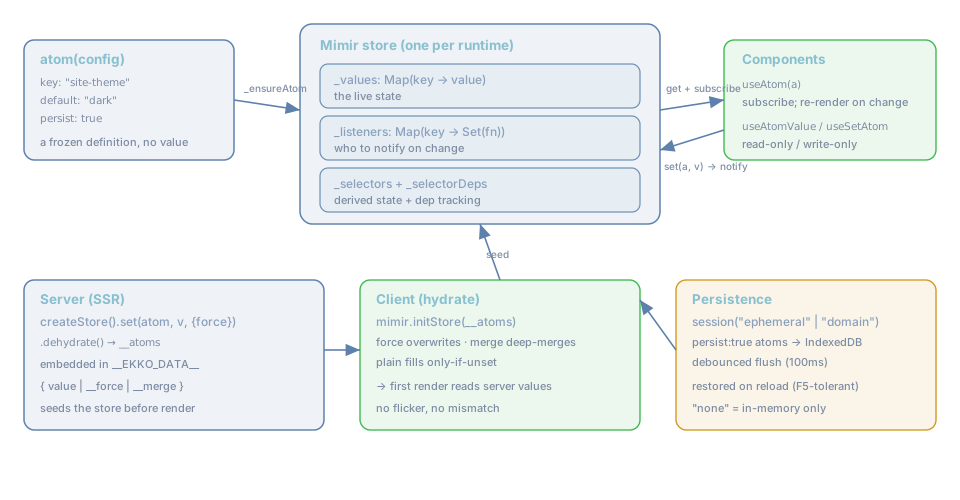
The mental model
- An atom is a definition: a unique
key, adefault, and whether it shouldpersist. It holds no
value itself, it is frozen and immutable.
- The store (one Mimir instance per runtime) holds the live
_values(aMapof key → value), the
_listeners (who to notify), and _selectors (derived state). It is the single source of truth.
- Components read atoms with hooks (
useAtom,useAtomValue,useSetAtom). Reading subscribes the
component; writing notifies every subscriber so they re-render.
- The server can seed the store (via
createStore().dehydrate()→__atoms) so the client hydrates
with the right values.
- Persistence (optional, via
session(...)) mirrorspersistatoms to IndexedDB so they survive a
refresh.
Why not just useState?
useState is fine for state that is local to a component and disposable. But:
useState | Mimir atom | |
|---|---|---|
| Survives a client navigation | no (component unmounts) | yes (atom is outside the tree) |
| Survives an F5 / reload | no | yes, with a session (IndexedDB) |
| Shared across distant components | needs lifting/context | yes, just import the atom |
| Seeded by the server for SSR | awkward | built in (ssr().__atoms) |
| Reactive without a Provider tree | – | yes (no <Provider> needed) |
Rule of thumb: if the state should outlive the component that set it, a navigation, or a refresh, it belongs in an atom. Otherwise
useStateis perfect, use both.
A worked example: what goes where
This is the part newcomers get wrong, they reach for useState for everything and then can't seed it from the
server, can't share it, or lose it on a reload. Here is a real board screen with the decision made explicitly
for every piece of state. The question each time is: does this need to outlive the component, a navigation,
or a reload? Yes, atom. No, useState.
Why each choice:
useris an atom, keyed"auth". The server already knows who is logged in and seeds theauthatom,
so the header is correct on the first paint and after a reload, with no flicker and no refetch.
useState would render null first and then flash to the user.
themeis an atom withpersist: true. A preference must survive F5 and be readable from any
component (the header toggle, the page background). That is a session-persisted atom, not component state.
issuesis an atom. The list is server-seeded for SSR (viassr().__atoms) and shared across
the board, the detail page, and the counts. The useState alternative is to lift it to a common ancestor
and prop-drill; an atom is that shared source without the plumbing.
filteris an atom. Open an issue, press back, the board should still show your filter. State that must
survive a client navigation lives outside the component tree, so it is an atom.
menuOpenisuseState. A dropdown's open/closed is local, transient, and meaningless once you leave
the screen. Keep it in the component. Use both: atoms for app state, useState for throwaway UI.
The tell is almost always that one question. Server-seeded, shared, or must-survive-a-nav/reload, atom.
Ephemeral, single-component UI, useState.
What's in this chapter
| Page | Covers |
|---|---|
| Atoms | Defining atoms: key, default, persist. |
| Reading & writing | useAtom, useAtomValue, useSetAtom, updater functions, reset. |
| Selectors | Derived state with automatic dependency tracking. |
| Subscriptions | subscribe, the imperative store API, outside React. |
| SSR & hydration | Seeding from the server, createStore, force/merge. |
| Persistence & sessions | none / ephemeral / domain, IndexedDB, F5-tolerance. |
| Patterns | Theme, forms, async data, lists, derived totals. |
| Pitfalls | Mistakes that bite, and how to avoid them. |
Server and client are the same API
Mimir ships in two implementations, a server-side one (used during SSR) and a client-side one (used in the
browser), but they expose the same surface: atom, selector, useAtom, useAtomValue, useSetAtom,
createStore, and a mimir instance with get/set/reset/subscribe. You write your atoms once and
they work in both environments; the seeding mechanism keeps the values in sync across the boundary.
The client version adds what only makes sense in a browser: useSyncExternalStore-style subscriptions that
drive React re-renders, and IndexedDB persistence. The server version is a one-shot store used to produce a
single HTML render. You rarely think about which one you are in, that is the point.
Next: defining atoms, Atoms.