

Documentation
Docs
Introduction
Getting Started
Tutorial: build an app
Core Concepts
Routing
Server-Side Rendering
Mimir, state management
Pages & Layouts
API Routes
Styling & Theming
Building & Deploying
API Reference
Guides
Recipes
FAQ (use cases)
The rendering pipeline
This is the single most important diagram in rune. Once it clicks, the rest of the framework is detail.
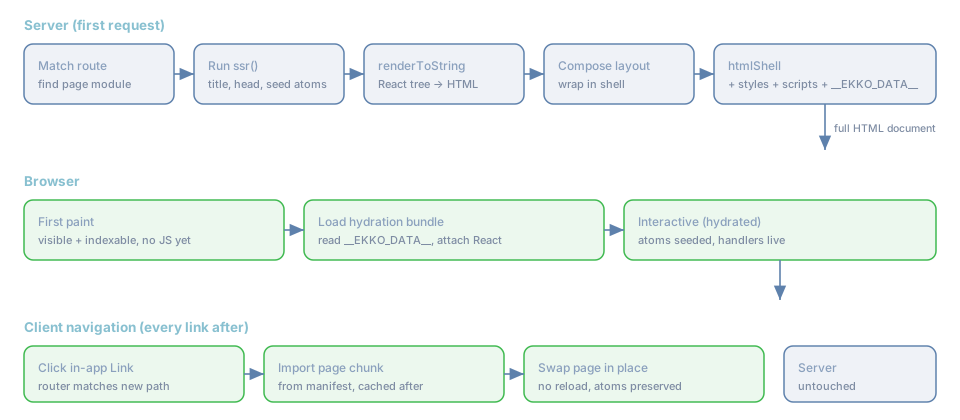
Stage 1 , the server renders (first request only)
When a request arrives for an SSR-enabled route, the server (_ssrRender in ekko:rune) does, in order:
- Match the route to its page module.
- Run
ssr()if the page exports one. Its return value provides thetitle, optionalheadtags, and
optional __atoms to seed Mimir before rendering. The seeded values are written into the store so the
server render and the client hydration agree.
renderToString(...)the React tree. Because you imported@ekko/react-dom/server, this is React's
real renderToString (hooks, context, the works). The page element is created and wrapped in the root
layout, exactly the same element tree the client will hydrate, so the markup matches.
- Resolve assets from the manifest: the page's client chunk, its imports (preloaded), its CSS, plus the
shared hydration entry and layout chunk.
htmlShell(...)assembles the full document:<head>with styles and SEO tags, the rendered body
inside <div id="__ekko">, <link rel="modulepreload"> for the chunks, the hydration <script type="module">,
and a <script id="__EKKO_DATA__" type="application/json"> carrying the hydration payload.
- Cache the HTML keyed by path (with the route's
ttlandtags) and return it.
The result is a complete HTML page. View source on any rune page, you see real content, not an empty root.
Stage 2 , the browser hydrates
The browser paints the HTML immediately (Stage 1's output needs no JavaScript to be visible). Then:
- It loads the hydration bundle named in the manifest (
manifest.hydrate). - The bundle reads
__EKKO_DATA__: the currentpagechunk URL, the__routestable, the__layout
chunk, the seeded __atoms, and any props.
- It rehydrates Mimir with
__atoms(souseAtomreads the server's values, no flicker, no mismatch). - It imports the layout chunk and the page chunk, builds
layout(page), and hydrates that React tree
onto the existing DOM, attaching event handlers without re-creating the markup.
Now the page is interactive. Details in Hydration.
Stage 3 , client navigation (every link after the first)
From here on, the app is a single-page application:
- The user clicks an in-app
<Link href="/x">(or callsnavigate("/x")). - The client router matches
/xagainst the__routestable baked into the page. - It imports that route's chunk (cached after the first time) and renders it inside the same layout,
in place. The URL updates via the History API.
- No server round-trip. Mimir atoms are untouched, so any state (theme, scroll position you stored, a
form draft) survives the navigation.
This is why rune feels instant after the first load: the only thing crossing the network on navigation is a JavaScript chunk you usually already have.
Why the markup matches (and why that matters)
A subtle but crucial property: the server composes the React element tree as rootLayout(page) and so does
the client. Because the same tree is rendered on both sides, hydration is a clean attach, not a re-render,
and you never see the "hydration mismatch" warnings that plague hand-rolled SSR. The ssr()-seeded atoms are
the mechanism that keeps data in sync to match the markup.
What does not get SSR'd
Dynamic routes (:param, *catch-all) are not pre-rendered into the cache, they serve a shell (the
layout with hydration data) and let the client render the page, because their content depends on the URL. You
can still give them an ssr() for the title and head. Static routes with an ssr() are the ones that get
the full cached render. See Strategies.
Next: the handoff in detail, Hydration.